• site home
  • blog home
  • galleries
  • contact
  • underwater
  • the bleeding edge

the last word

Photography meets digital computer technology. Photography wins -- most of the time.

You are here: Home / The Bleeding Edge / Dell T7500 OOBE 5 – RAID controller

Dell T7500 OOBE 5 – RAID controller

March 23, 2011 JimK 2 Comments

Sloggus interuptus. The RAID controller arrived yesterday. I picked HighPoint as the vendor for no reason other than they’re the supplier of the HBA that Western Digital ships with their 3 TB disks.  I plugged it in – it’s a tiny PCIe card – and wired up one of the 3 TB Hitachi drives to the handiest SATA connector. Upon booting I got the RAID BIOS screen, hit <Control> H, initialized the drive, and picked JBOD as the RAID type. Windows recognized the hardware, but didn’t install the driver. I went into the device manager, clicked “Update driver”, and pointed the file browser at the driver. It wanted a reboot. I gave it one. When it came up again, it had recognized the hardware, but wanted another reboot. After that process (which was quite different than what was in HighPont’s manual) things looked good to go.

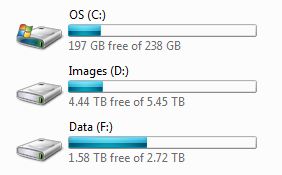
I made sure the disk worked, then added two more 3 TB drives and configured them as a striped array.

Now the file manager shows me this:
driveconfig

I’ve never had so much free space on a workstation. It seems like a lot now, but it probably won’t be long before it starts to feel cramped.

The Bleeding Edge

← Dell T7500 OOBE, part 4: now begins the slog Epson 4900 OOBE →

Comments

  1. Lawrence Ong says

    January 18, 2012 at 4:22 am

    hello,

    read your notes on T7500 — I’m planning to make it functional with 3TB drives as well — can you tell me which controller you used? If you can post the url that would be great too.

    thanks
    Lawrence

    Reply
  2. Jim says

    January 18, 2012 at 7:26 am

    HighPoint RocketRAID 640 PCI-Express 2.0 x4 SATA III (6.0Gb/s) Controller Card

    http://www.newegg.com/Product/Product.aspx?Item=N82E16816115077

    Reply

Leave a Reply Cancel reply

Your email address will not be published. Required fields are marked *

November 2025
S M T W T F S
 1
2345678
9101112131415
16171819202122
23242526272829
30  
« Oct    

Articles

  • About
    • Patents and papers about color
    • Who am I?
  • How to…
    • Backing up photographic images
    • How to change email providers
    • How to shoot slanted edge images for me
  • Lens screening testing
    • Equipment and Software
    • Examples
      • Bad and OK 200-600 at 600
      • Excellent 180-400 zoom
      • Fair 14-30mm zoom
      • Good 100-200 mm MF zoom
      • Good 100-400 zoom
      • Good 100mm lens on P1 P45+
      • Good 120mm MF lens
      • Good 18mm FF lens
      • Good 24-105 mm FF lens
      • Good 24-70 FF zoom
      • Good 35 mm FF lens
      • Good 35-70 MF lens
      • Good 60 mm lens on IQ3-100
      • Good 63 mm MF lens
      • Good 65 mm FF lens
      • Good 85 mm FF lens
      • Good and bad 25mm FF lenses
      • Good zoom at 24 mm
      • Marginal 18mm lens
      • Marginal 35mm FF lens
      • Mildly problematic 55 mm FF lens
      • OK 16-35mm zoom
      • OK 60mm lens on P1 P45+
      • OK Sony 600mm f/4
      • Pretty good 16-35 FF zoom
      • Pretty good 90mm FF lens
      • Problematic 400 mm FF lens
      • Tilted 20 mm f/1.8 FF lens
      • Tilted 30 mm MF lens
      • Tilted 50 mm FF lens
      • Two 15mm FF lenses
    • Found a problem – now what?
    • Goals for this test
    • Minimum target distances
      • MFT
      • APS-C
      • Full frame
      • Small medium format
    • Printable Siemens Star targets
    • Target size on sensor
      • MFT
      • APS-C
      • Full frame
      • Small medium format
    • Test instructions — postproduction
    • Test instructions — reading the images
    • Test instructions – capture
    • Theory of the test
    • What’s wrong with conventional lens screening?
  • Previsualization heresy
  • Privacy Policy
  • Recommended photographic web sites
  • Using in-camera histograms for ETTR
    • Acknowledgments
    • Why ETTR?
    • Normal in-camera histograms
    • Image processing for in-camera histograms
    • Making the in-camera histogram closely represent the raw histogram
    • Shortcuts to UniWB
    • Preparing for monitor-based UniWB
    • A one-step UniWB procedure
    • The math behind the one-step method
    • Iteration using Newton’s Method

Category List

Recent Comments

  • Paul R on Exposure metering
  • XUE on Dark Current in CMOS Sensors: Where It Comes From, and How Cooling Helps
  • Paul R on ISO setting for raw files
  • JimK on Pixel Response Non-Uniformity: Fixed Pattern Noise in the Light
  • Jared Bush on Pixel Response Non-Uniformity: Fixed Pattern Noise in the Light
  • JimK on Fujifilm GFX 100S pixel shift, visuals
  • Christopher Roberton on Fujifilm GFX 100S pixel shift, visuals
  • JimK on The 16-Bit Fallacy: Why More Isn’t Always Better in Medium Format Cameras
  • Colin Surprenant on Averaging captures, precision effects
  • JimK on The 16-Bit Fallacy: Why More Isn’t Always Better in Medium Format Cameras

Archives

Copyright © 2025 · Daily Dish Pro On Genesis Framework · WordPress · Log in

Unless otherwise noted, all images copyright Jim Kasson.