• site home
  • blog home
  • galleries
  • contact
  • underwater
  • the bleeding edge

the last word

Photography meets digital computer technology. Photography wins -- most of the time.

You are here: Home / The Last Word / Photoshop color space conversion accuracy

Photoshop color space conversion accuracy

October 1, 2014 JimK Leave a Comment

[Note: this post has been rewritten to correct an error. The cause of the error was that Bruce Lindbloom’s desk image on his web site is in the sRGB, gamma 2.20 color space, while I thought it was in the sRGB IEC61966-2.1 color space. That caused some rather large errors, which are much smaller once the image is converted to sRGB IEC61966-2.1.]

In yesterday’s post, we saw that model-based color space conversion accuracy as performed in Matlab using 64-bit floating point intermediate values, are dominated by the quantizing error of 16-bit per color plane images.

But what about the accuracy such conversions in Photoshop? I took a look.

I loaded the same test image that I used for yesterday’s experiments into Ps (thanks to Bruce Lindbloom for the image):
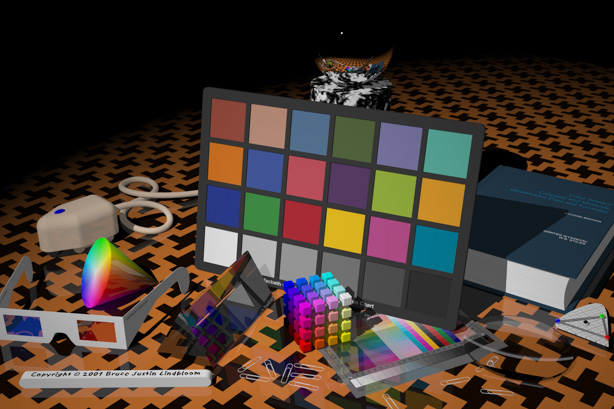
DeltaELrNoSharp


I took the image from its native sRGB to Adobe  (1998) RGB and back, using the Adobe (ACE) color engine, then I loaded the original image and the round-trip image into Matlab, converted both to Lab, and computed the deltaE for each pixel. Then I did that a few more times, starting with the last conversion and always comparing the latest image to the original one. I computed some stats on the deltaE image, and here’s what I got:.


rt-srgb-argb-1th


Then I took the original image to Lab in Photoshop, then back to sRGB. I did that iteration several more times, comparing with the result for the first round trip, and got this:
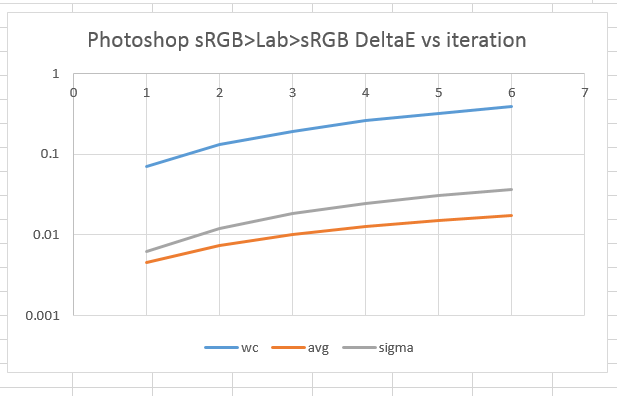
rt-srgb-lab-1th2

With this test image, Photoshop’s profile conversion accuracy seems to be pretty darned good.

The Last Word

← Do color space conversions degrade image quality? Photoshop color space conversion accuracy — 16M colors image →

Leave a Reply Cancel reply

Your email address will not be published. Required fields are marked *

December 2025
S M T W T F S
 123456
78910111213
14151617181920
21222324252627
28293031  
« Nov    

Articles

  • About
    • Patents and papers about color
    • Who am I?
  • How to…
    • Backing up photographic images
    • How to change email providers
    • How to shoot slanted edge images for me
  • Lens screening testing
    • Equipment and Software
    • Examples
      • Bad and OK 200-600 at 600
      • Excellent 180-400 zoom
      • Fair 14-30mm zoom
      • Good 100-200 mm MF zoom
      • Good 100-400 zoom
      • Good 100mm lens on P1 P45+
      • Good 120mm MF lens
      • Good 18mm FF lens
      • Good 24-105 mm FF lens
      • Good 24-70 FF zoom
      • Good 35 mm FF lens
      • Good 35-70 MF lens
      • Good 60 mm lens on IQ3-100
      • Good 63 mm MF lens
      • Good 65 mm FF lens
      • Good 85 mm FF lens
      • Good and bad 25mm FF lenses
      • Good zoom at 24 mm
      • Marginal 18mm lens
      • Marginal 35mm FF lens
      • Mildly problematic 55 mm FF lens
      • OK 16-35mm zoom
      • OK 60mm lens on P1 P45+
      • OK Sony 600mm f/4
      • Pretty good 16-35 FF zoom
      • Pretty good 90mm FF lens
      • Problematic 400 mm FF lens
      • Tilted 20 mm f/1.8 FF lens
      • Tilted 30 mm MF lens
      • Tilted 50 mm FF lens
      • Two 15mm FF lenses
    • Found a problem – now what?
    • Goals for this test
    • Minimum target distances
      • MFT
      • APS-C
      • Full frame
      • Small medium format
    • Printable Siemens Star targets
    • Target size on sensor
      • MFT
      • APS-C
      • Full frame
      • Small medium format
    • Test instructions — postproduction
    • Test instructions — reading the images
    • Test instructions – capture
    • Theory of the test
    • What’s wrong with conventional lens screening?
  • Previsualization heresy
  • Privacy Policy
  • Recommended photographic web sites
  • Using in-camera histograms for ETTR
    • Acknowledgments
    • Why ETTR?
    • Normal in-camera histograms
    • Image processing for in-camera histograms
    • Making the in-camera histogram closely represent the raw histogram
    • Shortcuts to UniWB
    • Preparing for monitor-based UniWB
    • A one-step UniWB procedure
    • The math behind the one-step method
    • Iteration using Newton’s Method

Category List

Recent Comments

  • JimK on Family photography with the X2D/XCD90V and the GFX 100 II/GF110
  • Jonathan on Family photography with the X2D/XCD90V and the GFX 100 II/GF110
  • Thomas on GFX 100 II pixel shift
  • JimK on Why wide-angle lenses stretch the edges of the frame
  • Pieter Kers on Why wide-angle lenses stretch the edges of the frame
  • Stefan Feaux de Lacroix on Fujifilm GFX 100RF inclusive review
  • Lou Jost on Leica 280/4 Apo-Telyt R on GFX 50R in infrared
  • JimK on Why wide-angle lenses stretch the edges of the frame
  • JimK on Why wide-angle lenses stretch the edges of the frame
  • Craig Stocks on Why wide-angle lenses stretch the edges of the frame

Archives

Copyright © 2025 · Daily Dish Pro On Genesis Framework · WordPress · Log in

Unless otherwise noted, all images copyright Jim Kasson.